
"
Can we reimagine enterprise software so that usability isn’t an afterthought, but a strategic advantage that drives adoption and retention?
"
Challenges

Fragmented teams
Align 30+ teams across nine org units, each with its own roadmap and leadership vision.

Legacy Products
When building the new vision, we had to keep mind that we have legacy products in the market. The simple lift and shift will not work.

Inconsistent data
We had to deal with a big amount of data that was not consistant most of the time and was not telling a coherent story

Absence of a design system
Our products were inconsistent and teams built the same components mulitple times. The design system was still being built

Broken collaboration
The trust relationship between design and other parts of organisation was broken. In general designers were severely under staffed.

Design driving Monetisaton at AWS
Led a cross-functional strategy to transform a complex cloud ecosystem into a SaaS-like experience, driving adoption by 30%
Background
In 2016, AWS was at an inflection point. After a decade of rapid, engineering-driven growth, AWS had become the market leader in cloud infrastructure—but also its own biggest competitor. Products were built as independent “building blocks” by separate teams, each optimized for speed and technical depth. The result was a fragmented, inconsistent experience that left enterprise customers stitching together their own workflows.
Leadership recognized that growth and retention hinged on ease of use, especially for enterprise DevOps and IT administrators. I was brought in as one of the earliest designer leaders to lead the UX strategy for AWS Management Tools—a suite responsible for fleet management, change management, automation, compliance, provisioning, and operations. The goal was to transform these building blocks into an integrated, SaaS-like experience that simplified how customers managed their infrastructure.

Leadership Responsibilities
-
Set the vision and UX strategy for simplifying AWS operations into task-based, modular experiences.
-
Defined KPIs linking design outcomes to business metrics such as ARR growth, onboarding efficiency, and reduced support tickets.
-
Built and scaled the design organization—hiring designers, researchers, design technologists, and writers.
-
Led a tiger team to drive the discovery phase, define personas, map jobs-to-be-done, and deliver the first integrated prototypes.
-
Pitched the strategy to executives and GMs, securing buy-in and resources
When I first stepped into AWS Management Tools, the challenge wasn’t just about fixing usability—it was about untangling years of fragmented growth and aligning a sea of teams around a single vision. My first move was to slow down and run a proper discovery phase. Together with the research team, we dug through every piece of existing research in the repository, mapping pain points, identifying knowledge gaps, and benchmarking the current experience.
One of the hardest parts was that the vision wasn’t clear, funding cycles were already closed, and annual goals were locked. Rather than seeing that as a blocker, I used it as an opportunity to focus on understanding the problems deeply and crafting a compelling future state. I began writing a series of vision and strategy documents—the preferred language at AWS—to share insights, outline opportunities, and define what we called “Consumer Grade Enterprise UX”: an easier, more human experience for DevOps and IT admins.
On a personal level, this project was especially challenging because I had just started my tenure at AWS. As a first-year Amazonian, I was still learning the cultural nuances of securing funding and resources—an essential part of getting large initiatives off the ground. While I had strong support from senior leadership, the project faced significant resistance due to its scale and the internal dynamics around ownership and which teams should lead it. I quickly realized that to navigate the politics and complexity, I needed to stay laser-focused on the vision and the path forward, rather than getting bogged down by technical constraints or organizational friction at the outset.
Discovery phase
First, it was essential to establish a solid foundation. Together with the discovery team, we launched a comprehensive research effort, applying multiple methodologies to uncover insights. We used MaxDiff to prioritize the most critical user tasks, clickstream and usage pattern analysis to reveal behavioral trends and segment users, and benchmark evaluation studies to audit the platform’s functionality and assess how design system components were being applied. This foundational research gave us a clear picture of the current state and pain points. It also provided the evidence we needed to build a strong business case, align with product roadmaps, and surface any organizational changes required to support the future vision.
Quantitive research
Cluster Analysis
Measure base line usability
Conjoined analysis for feature adoption
MaxDiff
Qualitative Research
User interview
Card sorting
Focus groups
Journey mapping
Road map aligment
Heuristic Evaluation / Expert Review
Competitive Benchmarking
Cognitive Walkthroughs
Deeply understanding the persona
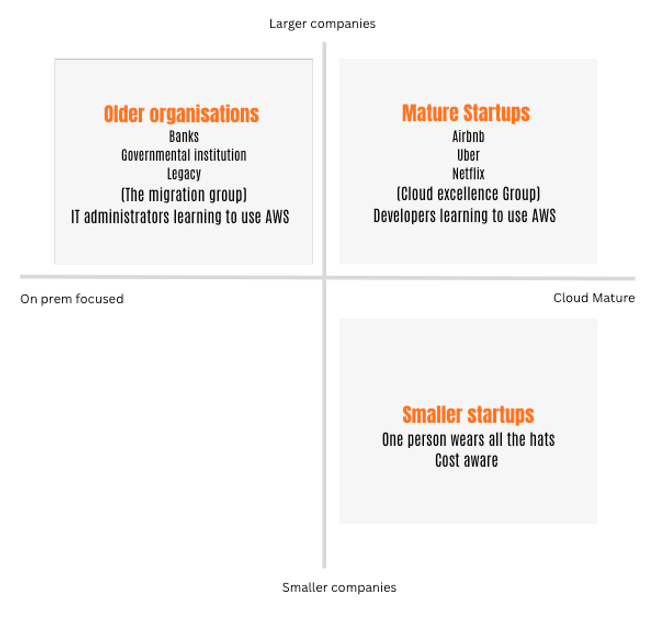
While conducting research, we uncovered a critical gap: our personas didn’t align with those used by leadership. The design team was focused on IT administrators and DevOps practitioners—the hands-on users of AWS Management Tools—while management primarily engaged with executive decision-makers higher up in the customer organizations. This disconnect led to conflicting priorities and unclear expectations about how different roles actually used the tools.
To bridge this gap, we dug deeper into customer organizations, mapping the full ecosystem of roles, their responsibilities, and their influence on adoption and usage. This effort resulted in a persona matrix that clarified not only who we were designing for but also how each persona interacted with AWS Management Tools. This shared understanding became a crucial alignment tool between the design team, product leaders, and executives.

When we mapped company size and cloud maturity against our archetype personas, we uncovered a crucial insight: most users weren’t confined to a single role. In many cases, the same individual was switching responsibilities depending on the task at hand—a developer might be writing code one day, acting as a cloud architect the next while setting up infrastructure, and then taking on the role of an on-call engineer monitoring system uptime the following day.
To capture this reality, we introduced the concept of “hats.” Each “hat” represented a role or responsibility the user would take on in a given context. This framework helped us design experiences around tasks and responsibilities, rather than rigid job titles, making the product more adaptable to how real users actually work.

Our research surfaced three primary personas, each with distinct needs and workflows. Using MaxDiff analysis, we were able to identify the top ten pain points that consistently caused friction for customers across the platform. We then mapped these pain points against each persona’s journey to understand how they manifested differently for each group. This approach helped us prioritize the most critical issues to address first—those that had the biggest impact across multiple personas—allowing us to focus our design efforts where they would drive the fastest and most meaningful improvements to the overall experience
Identifying jobs to be done

Oppertunity matrix based on usage patterns
By analyzing usage patterns and frequency, we were able to see not just what customers struggled with, but also how often these pain points occurred and how deeply they affected their workflows. We plotted these insights on an opportunity matrix, mapping impact versus effort to reveal where the greatest ROI could be achieved. This framework allowed us to prioritize initiatives that would deliver the most significant improvements for customers with the least investment, ensuring that our roadmap focused first on the opportunities with the highest business and user value.

Brining the teams to think about the journey


Customer centric approach
"
Most of the time I am not sure what I am doing. I am lost in the documentation. Why can't it be easier?
It's somewhat shocking that every service team seems to be doing their own thing in terms of management of the console.
This is Frustrating, I have more than 20 tabs open! AWS keeps shipping their organisational structure and we suffer
"
"
- IT operator in a financial institution
- IT admin in mid-size startup
- DevOps engineer in a startup
"
"
"


The main question:
How do create a coherent, modular and integrated experience that simplifies and automates tasks related to operations management?
Metrics to track
"Objective: Improve end-to-end user success and satisfaction across the Build suite."
-
Increase first-feature adoption success rate by +20%.
-
Reduce average time-to-onboard by 30%.
-
Achieve >80% task success rate in key hub flows
-
Improve NPS or SUS (System Usability Scale) by +10 points.
Objective: Demonstrate design’s contribution to adoption and revenue.
-
Drive +15% growth in cross-feature adoption.
-
Reduce support tickets or help-desk calls related to Build UI by 25%.
-
Improve retention rate or ARR uplift among accounts with high Systems Manager usage
Objective: Scale design quality and efficiency across global teams.
-
90% of new features built using the shared design system.
-
Reduce design cycle time (concept → validated prototype) by 20%.
-
Maintain >80% designer engagement and satisfaction (internal survey).
Enterprise software should adapt to how people work, not the other way around.”
Design Principles
This initiative gave us an opportunity to rethink AWS Management Tools from the ground up—shifting away from service-centric workflows toward solutions built around the customer’s mental models.
We aimed to create an experience that was simplified, integrated, and focused on real tasks, reducing the complexity of managing cloud infrastructure at scale.
01
Task-Focused Experience
Built experiences around what users need to do—provision, automate, monitor—rather than around AWS service silos.
02
Modular and Repeatable
Created reusable patterns and workflows that scale consistently across accounts, regions, and teams.
03
No UX-UX” Simplicity
Kept complexity behind the scenes—smart defaults, automation, and contextual guidance made the experience feel almost “magical.”
04
Progressive Disclosure
Tailor flows for different personas and permissions (admins, operators, architects, compliance officers) so each role sees the most relevant tools and data.
Ideation phase
We realized the real change wasn’t about adding features but about rethinking how people experience AWS. For years, the interface mirrored our internal org charts, while customers just wanted to get work done. This resulted in customers needing to have a number of tabs open to perform their tasks.
We shifted the focus to the user and their tasks, designing workflows that felt natural to them—not to us. The new experience revolved around four pillars: a centralized quick-setup flow that hides complexity, role-based hubs that adapt to the “hat” the user is wearing, incident-driven monitoring that brings all relevant data into one view, and an automated remediation layer so users can resolve issues in the same place they see them.
This is what we mean by consumer-grade enterprise UX: an experience that removes friction, surfaces what matters in the moment, and hides complexity behind smart defaults—making powerful infrastructure feel intuitive and effortless.

1.
Easy Setup
A task-focused UX should let users define their desired end state and key parameters while the system handles the heavy lifting—removing unnecessary steps and technical complexity.

2.
View information in dedicated hubs
The experience is organized into modular hubs, each tailored to the specific “hat” or role the user is wearing—whether they’re deploying, monitoring, or troubleshooting—keeping tools relevant and focused.

3.
Monitor
Enterprise users don’t log in for exploration; they come to detect, understand, and respond to issues. We designed monitoring around predictive dashboards and incident timelines that surface anomalies and enable swift action.

4.
Remediate
When problems arise, users need options. Our approach supports multiple remediation actions—whether it’s fixing the issue directly, reporting it, assigning it to a teammate, or choosing to defer it—empowering teams to respond in the way that best fits their workflow.
Ideating with teams on their part of the story


.png)


First : easy setup configuration
We introduced a library of recommended setups and configurations tailored to common use cases. Customers could pick a configuration and apply it across accounts, regions, or even their entire organization—all without wrestling with unnecessary complexity.
Instead of overwhelming users with endless fields, we focused on the essentials: what the setup does and where it should be applied—whether to a single instance, an entire account, or the full organizational structure.
Under the hood, the experience was powered by CloudFormation substacks, making it easy for power users to customize and extend. We designed the product itself as a platform, allowing teams to plug in their own configurations and workflows, creating a flexible foundation that could scale with customer needs

We introduced a library of recommended setups and configurations tailored to common use cases. Customers could pick a configuration and apply it across accounts, regions, or even their entire organization—all without wrestling with unnecessary complexity.

The library was created and owned by my team as a platform, not just a catalog of templates. It offered customers ready-to-use setups that worked across accounts, regions, or entire organizations, while allowing other AWS teams to build and publish their own quick-start configurations.
This approach delivered immediate value to customers and scaled internally, enabling faster innovation, greater consistency, and a growing ecosystem of reusable solutions
When a user selects a configuration package, they’re shown a clear preview of which steps will be created and how they’ll run. They can then choose where to apply these actions—to a single instance, an account, or the entire organization.
Each action comes with pre-filled fields based on AWS best practices, so customers can launch quickly with recommended defaults or switch to an advanced mode for full customization.

+200% Feature Expansion Depth
40% Integration with automated workflows.
56 Step to 1 Step
Specialised hubs around use cases
Selecting and configuring a package results in the creation of a curated bundle of AWS services—all tailored to the specific use case the customer has chosen.
Rather than reinventing the wheel, the UI layer was designed on top of existing AWS services, abstracting away their complexity and presenting them as a single, unified workflow. Behind the scenes, the system orchestrates multiple services—networking, compute, storage, security—so that customers don’t need to configure each one individually.

.png)
+ 64% Cross Feature Adoption Rate
-20% Time to First CrossFeature
+50% MoM growth rate in cross account deployment
Incident monitoring

Monitoring and dashboarding became the heart of the experience. We recognized that users rarely monitor just for the sake of it — they monitor because something happens: an incident, an anomaly, a compliance flag.
To support this, we introduced a unifying concept called an “Ops Item.” Each Ops Item represents a specific incident or event, capturing when it happened, what was affected, and why. The system automatically pulls in all the relevant context — monitoring metrics, logs, compliance details, and related alerts — into a single, consolidated view.
This approach turned what was previously a scattered, service-by-service experience into a centralized incident hub, enabling users to quickly understand the situation and take action without switching between tools or dashboards.
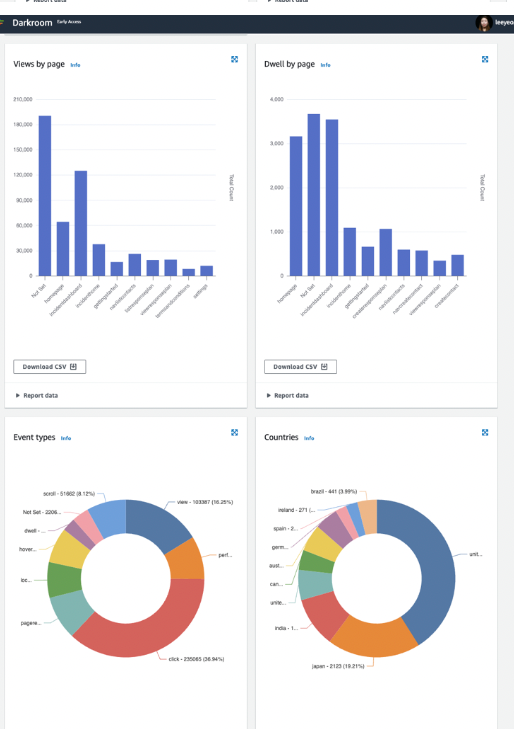
- 45% Mean time to identify (MTTI)
-70% Mean time to resolve (MTTR)
-30% Context switching and screen time
Remediations

We introduced a library of recommended setups and configurations tailored to common use cases. Customers could pick a configuration and apply it across accounts, regions, or even their entire organization—all without wrestling with unnecessary complexity.

We introduced a library of recommended setups and configurations tailored to common use cases. Customers could pick a configuration and apply it across accounts, regions, or even their entire organization—all without wrestling with unnecessary complexity.

We introduced a library of recommended setups and configurations tailored to common use cases. Customers could pick a configuration and apply it across accounts, regions, or even their entire organization—all without wrestling with unnecessary complexity.
AWS Management tools
Impact
-45%
Reduced support tickets
+120%
Customer Satisfaction
+70%
Engineering efficiency
2nd
Most used service in AWS
Achievement
"
" Going through the capabilities and experience of Systems Manager is beyond the purpose of this post, but the people who built it and keep building it are some of the unsung heroes of the company. If you have not followed the evolution of this service, you should pay attention "https://perilli.com/acontrarianview/amazon-has-won-enterprise-it-management/
"
01
Product and user experience
Influence and design the creation of end to end user human centric experience in the management tools with a design led approach.
Define strategy and set milestones for multiple teams
Provide creative leadership and input for relevant design and product decisions.
02
Design Operations
Define structures and processes to raise the bar on design and manage design and product delivery.
Identify ways of collaborations with other teams.
Enable creativity and growth by giving space to the team to focus on their craft.
03
Team
Build a fully staffed design team with a strong culture where teams are motivated and challenged. Foster and grow talent with clear career paths.
Plan and manage the resourcering demand and the manage external design vendors and partners.
04
Collaborations
Align the design team with other disciplines and stakeholders across the organisation.
Promote the capabilities of the design team.
Represent the design discipline internally and externally.
Home
About
Contact